
It seems spreadsheets & dinosaurs on a collision course. How else can you explain Jon’s XKCD Velociraptor problem solved with Excel and now this. Debby, an alert reader of our blog sent me this email yesterday.
I need an algebraic formula to solve this in Excel
I have 5 heads, 5 bodies, 4 arm sets, 4 leg sets and 3 tails. I need to see if I can create 1000 dinosaurs from these, and if that’s too many AND I need the 5 digit groupings to prove it and create them.
basically Xa*Xb*Xc*Xd*Xe=1000 – I’m not supposed to go over 1200. […] And then I want the 5 digit combinations if possible – right now they are trying to do the combinations by hand – would be awesome if we could do it in Excel.
Ladies & gentlemen, let’s fire up Excel
There are two problems to solve.
(1) How many dinosaurs can be made?
(2) Listing of all such dinosaurs.
The first one is easy.
We just multiply the number of heads, bodies, arms, legs & tails. I know this sounds biologically impossible. But in math everything is possible. So we get =5x5x4x4x3 = 1200
That means, given the body part variations, we can generate 1,200 dinosaurs. Some of them may be hideous, but 1,200 of them nevertheless.
Making 1200 dinosaurs in Excel
This is very simple. We just use the MakeDinosaur() formula in Excel.
Of course, I am kidding. There is no MakeDinosaur(). Instead, we can use the all powerful INDEX().
Let’s say, we have listed the various parts in a range like this:
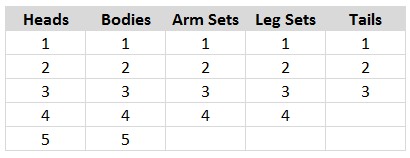
Now, each of those ranges are conveniently named as heads, bodies, arms, legs and tails.
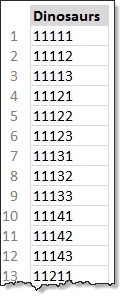 Next, in an empty column, we list 1200 running numbers. Side note: we could do away with this step and use ROWS() function. But dinosaurs don’t mind helper columns.
Let’s say, these running numbers are in H4:H1203.
We now use our T-rex sized INDEX formula.
=INDEX(heads,(H4-1)/240+1) & INDEX(bodies,MOD((H4-1)/48,5)+1) & INDEX(arms,MOD((H4-1)/12,4)+1) & INDEX(legs,MOD((H4-1)/3,4)+1) & INDEX(tails,MOD((H4-1),3)+1)
This generates all combinations of dinosaurs.
Let’s dissect the t-rex. Shall we?
- The formula is a concatenation of five INDEX functions.
- Each fetching one body part viz head, body, arm, leg or tail
Head portion:
Formula: INDEX(heads,(H4-1)/240+1)
What it does? There are 5 head choices and 1200 possible dinosaurs. That means, each type of head is attached to 240 (1200/5 = 240) dinosaurs.
So, we simply take the number in H4, divide it with 240 and figure out which head to use.
Body portion:
Formula: INDEX(bodies,MOD((H4-1)/48,5)+1)
What it does? So we now have 240 possible dinosaurs with a given head. And we have 5 types of body. That means 48 dinosaurs per each type of body given a head type.
We could use INDEX(bodies, MOD(H4-1,240)/48 +1) to get the corresponding body number.
Alternatively, we can use the simplified version INDEX(bodies,MOD((H4-1)/48,5)+1)
Why does it work? That is for you to figure out. There is a reason we are not extinct yet.
Remaining parts:
We use similar logic to fetch other body parts.
Download the dinosaurs
Download the 1,200 dinosaurs. Be careful, #14321 is a bit loony. She almost bit my shift key.
How would you make ’em dinosaurs?
Of course, we could use VBA, other formulas to make these nasty reptiles. What would you do if someone asks you create a few dinosaurs? Share your recipe in the comments.
Stop stomping & start succeeding @ spreadsheets
Do you resort to manic stomping and rampage when a spreadsheet goes astray? Take things into control. Sharpen your spreadsheet skills. Check out below pages:


