
We, adults can’t escape three things:
- Deadlines
- Demanding bosses (replace with customers or nagging spouses or naughty kids)
- Taxes
While I can’t help you with demanding bosses or taxes, when it comes to deadlines, I have the right tool for you.
A tracker that highlights all overdue items so that you know where to focus your attention.
Let’s learn how to use awesome powers of Excel to find-out which items are due. You can apply these concepts to nail down over due invoices, pending project tasks or scheduling workforce.

Highlight overdue items using Excel Conditional Formatting – Video
Please watch the below video tutorial to understand how to highlight overdue items with conditional formatting.
You can watch this video on our YouTube channel too.
Interactive highlighter – use form controls + CF for awesome effect
In the downloadable workbook, find this cool interactive highlighter. Examine the formulas & conditional formatting rules to unlock the mystery behind this.
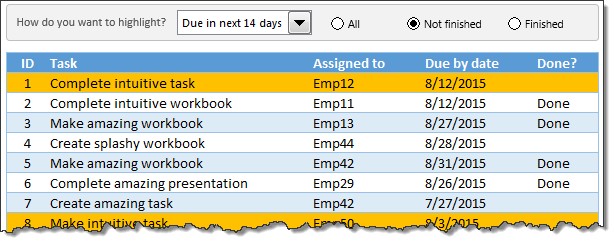
How to deal with deadlines?
Whenever I am doing a project, I use conditional formatting to keep track of the progress. In fact, right now, I have a file (with conditional formatting) to keep track of Awesome August festival.
What about you? How do you deal with deadlines & pending items? Please share your tips and ideas by writing a comment.
More on highlighting & deadlines
If you deal with a lot of deadlines (who doesn’t?), you will find below links very useful.
- Highlighting due dates in Excel – formulas & conditional formatting logic explained
- Make an interactive calendar to keep track of events & appointments
- Working with date & time values in Excel – an overview
- 5 Conditional formatting tips to make you a rock star at work
Formulas & concepts used in the workbook


